How to Digitize Supplier Contacts with a Business Card Scanner: An OCR Guide for Procurement Teams
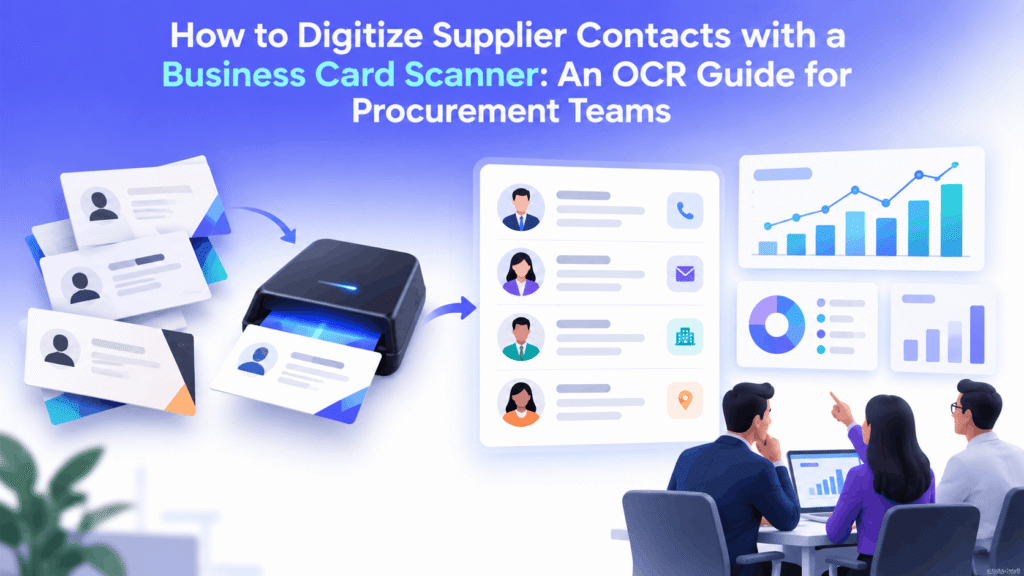
A business card scanner is a tool that uses optical character recognition (OCR) to read printed contact details from a business card and convert them into structured, editable data. For procurement teams, it turns stacks of supplier cards from trade shows and outreach events into searchable records in a CRM, Excel sheet, or supplier management platform within seconds.
Key Takeaways: Business Card Scanner Quick Facts
- A business card scanner uses OCR to extract names, titles, companies, phone numbers, emails, and addresses from a card image.
- Business card OCR replaces manual typing, which costs U.S. companies an estimated $28,500 per employee each year.
- Most OCR card scanner tools export contacts to Excel (.xlsx or .csv), Salesforce, HubSpot, or Microsoft Dynamics.
- Accuracy depends on image quality, card design, and a human verification step before records go live.
- STARS Supplier Success includes a business card scanner built for supplier diversity and procurement outreach teams.
Why Procurement Teams Need a Business Card Scanner in 2026
Procurement teams need a business card scanner because supplier contacts collected at events, matchmaking sessions, and site visits often stay trapped on paper. OCR scanning captures those contacts on the spot, cuts data entry time, and makes new suppliers visible to sourcing managers before the relationship goes cold.
Supplier outreach still runs on face-to-face meetings. According to Statista (2024), U.S. marketers planned to attend an average of 42.4 in-person regional trade shows in 2024. Every one of those events produces a pile of business cards.
The real cost shows up after the event. According to Parseur (2025), manual data entry costs American companies an average of $28,500 per employee annually. Respondents reported spending more than 9 hours per week moving data by hand.
What happens to supplier contacts that are never digitized?
Undigitized supplier contacts are effectively lost. A card in a drawer cannot be searched, shared with category managers, or counted in a supplier diversity report, so a qualified minority-owned, women-owned, or veteran-owned business may never be invited to bid.
How a Business Card Scanner Works: OCR Card Scanner Basics
An OCR card scanner works by photographing or scanning a card, detecting text regions, converting the characters to digital text, and then classifying each line into fields such as name, title, company, email, and phone. Modern business card OCR tools add AI to recognize logos, multiple languages, and nonstandard layouts.
Here are the five stages most OCR card scanner tools follow:
- Image capture: A smartphone camera or card feeder captures the card.
- Image cleanup: The software straightens, crops, and sharpens the image.
- Text recognition: OCR engines, such as Google Cloud Vision or Microsoft Azure AI Document Intelligence, read the characters.
- Field mapping: The tool sorts text into contact fields and flags uncertain values.
- Export: Verified records sync to a CRM, spreadsheet, or supplier portal.
What is the difference between business card OCR and manual data entry?
The difference between business card OCR and manual data entry is speed, consistency, and scale. OCR captures a card in seconds and applies the same field rules every time, while manual entry takes minutes per card and introduces typos. The table below compares both approaches.
| Factor | Business Card OCR | Manual Data Entry |
|---|---|---|
| Time per card | 3 to 10 seconds | 2 to 4 minutes |
| Error pattern | Misreads on stylized fonts | Typos and skipped fields |
| Scalability | Hundreds of cards per hour | Limited by staff hours |
| Data format | Standardized fields | Varies by person |
| Best use | High-volume events | Small, one-off batches |
Step-by-Step: Using a Business Card Scanner to Digitize Supplier Contacts
To digitize supplier contacts with a business card scanner, capture each card at the event, let OCR extract the fields, verify the results, enrich the record with supplier details such as certifications, and export the clean data to Excel or your supplier management system. The full process takes minutes instead of days.
Follow these seven steps after any supplier event:
- Scan at the booth. Capture cards immediately so nothing gets lost in transit.
- Add context notes. Tag the event name, date, and commodity category, such as IT services or facilities maintenance.
- Review OCR output. Check email addresses and phone numbers, since one wrong character breaks outreach.
- Remove duplicates. Match against existing supplier records by company name and email domain.
- Enrich the record. Add NAICS codes, certification type (MBE, WBE, VOSB, SDVOSB, HUBZone), and expiration dates.
- Export the data. Push records to Excel, a CRM, or a supplier portal.
- Trigger follow-up. Send a registration invite within 48 hours while the conversation is fresh.
How do you send business card scanner data to Excel?
To send business card scanner data to Excel, export scanned contacts as a .csv or .xlsx file from the scanner app, then open the file in Microsoft Excel. Most tools, including ABBYY Business Card Reader and CamCard, map fields to columns automatically, so each row becomes one supplier contact ready for filtering.
A clean business card scanner to Excel workflow uses consistent column headers, which makes later imports into Salesforce, SAP Ariba, or Coupa much easier.
When should you use business card data entry services instead?
Business card data entry services make sense when a team has a large backlog of old cards, handwritten notes on the back of cards, or poor-quality images that OCR cannot read reliably. Many services combine OCR with human review, delivering verified spreadsheets for teams without in-house data staff.
Business Card Scanner Best Practices for Supplier Data Quality
The best business card scanner practices for supplier data quality are verifying every scanned record, standardizing fields, deduplicating against existing vendors, and enriching contacts with certification data. Scanning captures contacts quickly, but data governance determines whether those contacts are trustworthy enough for sourcing decisions and diversity reporting.
Data quality is now a board-level concern. According to Dun & Bradstreet (2025), 54% of organizations adopting AI have concerns over the trustworthiness and quality of their data. Supplier records built from unchecked OCR output feed that problem directly.
Strong supplier data also supports resilience. According to Deloitte (2025), 61% of chief procurement officers rely on supplier information sharing and collaboration to mitigate risk. That collaboration starts with accurate contact records.
Keep these rules in place:
- Assign one owner to approve scanned records weekly.
- Require email, company name, and certification status.
- Store the original card image for audits.
For a deeper look at this problem, read the STARS guide on why data quality is the biggest challenge in supplier diversity reporting.
Real-world example: a contact scanner supplier workflow in practice
Large buyers prove how much supplier data matters. According to the California Public Utilities Commission (2026), California utilities spent $13.15 billion with diverse suppliers in 2025, and that spend is tracked and reported under General Order 156. Programs at this scale depend on clean supplier contact records.
Consider an illustrative scenario: a utility supplier diversity team attends three regional matchmaking events and collects 400 cards. Typed manually at 3 minutes each, that is 20 hours of work. With a contact scanner supplier workflow, the team scans cards at each booth, reviews flagged fields in about 4 hours, and sends registration invites the same week.
How STARS Business Card Scanner Supports Supplier Diversity Teams
The STARS business card scanner helps supplier diversity and procurement teams capture supplier contacts at events and move them directly into the STARS Supplier Success platform. Scanned contacts can then be registered, enriched, checked against diversity certifications, and included in Tier 1 and Tier 2 spend reporting.
STARS connects the scanner to the rest of the supplier lifecycle:
- Supplier registration: Invite scanned contacts to complete a profile.
- Data scrubbing and enrichment: Clean and complete supplier records.
- Engagement and outreach center: Run follow-up campaigns after events.
- Spend reporting and analytics: Track how new suppliers affect diversity goals.
Learn how this data fuels a data-driven supplier diversity strategy and supplier diversity metrics.
Conclusion: Make Your Business Card Scanner Part of Supplier Strategy
A business card scanner turns event contacts into usable supplier data for buyers and supplier diversity managers. First, OCR eliminates slow, error-prone manual entry that drains staff hours after every event. Second, a structured workflow with verification and Excel or CRM export keeps records accurate. Third, connecting scanned contacts to registration, certification checks, and spend reporting turns a single card into a measurable sourcing opportunity.
Ready to capture every supplier you meet? Contact STARS today for help with all your supplier diversity needs.
Help Center
Frequently Asked Questions About Business Card Scanners
A contact scanner helps supplier diversity programs by capturing diverse suppliers met at outreach events before their details are lost. Once digitized, contacts can be invited to register, verified for MBE, WBE, or SDVOSB certification, and counted toward Tier 1 and Tier 2 diversity spend goals.

Marketing professional passionate about people, creativity, and meaningful growth. Proud to be part of the STARS team, empowering businesses to discover and manage diverse suppliers through one powerful platform.